Download FLC
One zip from the official GitHub release, two folders, two minutes.
Version 0.8.1.1
Released November 4, 2026 · 981 KB · One zip with two folders: the addon and its quest catalog.
Download FLCFLC-0.8.1.1.zipTested with game client 1.60.1.70755 on our own development server, not yet on the official realms.
What's new in 0.8.1.1 Release page on GitHub(opens GitHub in a new tab)
Verify the file (optional)
To check that your file is complete and untouched, open PowerShell in your Downloads folder and run:
Get-FileHash .\FLC-0.8.1.1.zip -Algorithm SHA256The result must be exactly this:
756879FD789F9D6506D4E0A8B6BC30DB83D5A1B3A3E0684A7228973D4CB63761Install on Windows
About two minutes. You only copy two folders.
0/8 steps done, saved on this device
Get the zip
Copy two folders
-
Open your AddOns folder #
Usually
World of Warcraft\_forever_\Interface\AddOns. If your install uses another folder name, look for the one that containsInterface\AddOns.Inside the folder where World of Warcraft is installed, open _forever_, then Interface, then AddOns.
-
Extract the two folders #
Copy ForeverLevelingCompanion and FLC_Guides_Catalog from the zip into AddOns. The zip also holds INSTALL.txt, with these same steps: AddOns does not need it.
-
Check that nothing is doubled #
The two folders must sit side by side, not one inside another folder with the same name:
Correct - _forever_
- Interface
- AddOns
- FLC_Guides_Catalog
- ForeverLevelingCompanion
- AddOns
- Interface
Wrong: a folder inside a folder - AddOns
- FLC-0.8.1.1
- ForeverLevelingCompanion
- FLC_Guides_Catalog
- FLC-0.8.1.1
- _forever_
Turn it on in the game
-
Start the game #
Log in as usual.
-
Turn FLC on #
On the character screen, open AddOns and check that both are enabled: Forever Leveling Companion and FLC Guides: Forever quest catalog.
-
Choose your look #
The first time, the welcome setup asks: adapt FLC to your interface, configure it yourself, or skip.
/flc setupopens it again.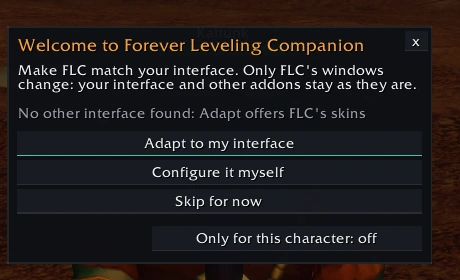
In-game capture · FLC 0.8.1.1-rc1 You are done when you see this: the welcome setup, the first time FLC starts.
Updating and uninstalling
To update, delete both old folders first, then extract the new zip. /flc version tells you which version you have and where to get the new one. To uninstall, delete both folders.
Troubleshooting
FLC does not appear
Type /flc in the chat: it shows or hides the guide window. A left click on FLC's minimap button does the same. If nothing happens, FLC is not loaded: see the next point.
The addon does not load
On the character screen, open AddOns: both must be listed and enabled. If they are missing, the folders are in the wrong place or one is inside another (step 5). If only the catalog is listed and it reports a missing dependency, the ForeverLevelingCompanion folder is missing or renamed. Still stuck? Delete both folders, download the zip again, check its SHA-256 and copy them once more.
I can't see the minimap button
Type /flc minimap show, or turn it on in Options. Hold Shift and drag it to move it around the minimap. Square minimaps (ElvUI and others) are supported but not tested in the client yet: if it looks wrong, tell us.
How do I open Options?
/flc options, or right-click the minimap button and choose Options.
How do I change FLC's look?
/flc appearance, or right-click the minimap button and choose Appearance. Apply keeps the preview, Cancel goes back. /flc setup opens the welcome setup again.
How do I open the Loot Atlas?
/flc atlas, or right-click the minimap button and choose Loot Atlas.
How do I report a bug?
Type /flc bug when it happens: FLC prepares a text with what we need. Copy it and paste it on our reports page.
Known issues
- Quest data comes from our test server: levels, quest givers and places may differ on the official realms. What is not confirmed says "in review" or "(?)": report it with /flc review.
- Some boss abilities are still in review.
- Memory: about 18 MB at login with the catalog, up to about 20 MB after opening the Loot Atlas and generating a route.
- Square minimaps and LibDataBroker launchers (ElvUI datatexts, Titan Panel) are not tested in the client yet.
- On the quest reward window, FLC's mark slightly overlaps the item's name (cosmetic).
- The arrow has no position inside dungeons (a game limit): dungeon guides move on with the game's encounter events instead.
Something else? Maybe someone already reported it: Open reports(opens GitHub in a new tab)
Requirements
- World of Warcraft: Forever on Windows. Tested build: 1.60.1.70755.
- No other addon is needed. TomTom is optional.
- A free GitHub account, only if you want to send reports.
Game builds
What we tested, and where. Every run was on our own development server.
-
1.60.1.70755Tested in client The build Battle.net installs today: every launch test passed with 0.8.1.1 -
1.60.1.70707Tested in client Tested with 0.8.1 and 0.8.1.1 -
1.60.1.70532Tested in client Tested during development (0.8.1 candidate) -
1.60.1.70658 · 70685Not tested No client of these builds was available; replaced by 70755 - Official WoW: Forever realms Not tested Not checked yet